Back office automation in a mid-sized company should start with the task, and the tool comes second. Choosing the tool first is the trap. A good first task comes back every week or every day, follows written rules, rarely needs an exception and already has its data in a system such as your ERP. Invoice matching passes that test when each invoice has a purchase order and a goods receipt behind it, while payroll keeps a person on the final approval even when the system does the calculations.
Then name the person who will handle the cases the automation cannot. That person matters more than the software.
What counts as back office automation?
It is software doing the repeatable steps of internal work: matching an invoice to its order, routing an approval, creating accounts for a new starter. People keep the decisions and the exceptions. The tools range from rules inside your ERP to integration platforms, robotic process automation and AI agents, and the choice of tool comes after the choice of task.
Why does the first task matter more than the tool?
Because a tool only helps once the task is clear, and money is not the main brake. In June 2026, around 7% to 14% of UK businesses in each size band named cost as a barrier to AI, while around 18% of businesses with 100 to 249 employees said a lack of expertise had slowed them down (ONS, July 2026).
The work is already shifting. In September 2026, 38% of UK businesses with 10 or more employees that use AI said administrative and clerical roles were the most affected (ONS, October 2026). The useful question is which part you change first, and who stays responsible for it.
How do you choose the first back office task to automate?
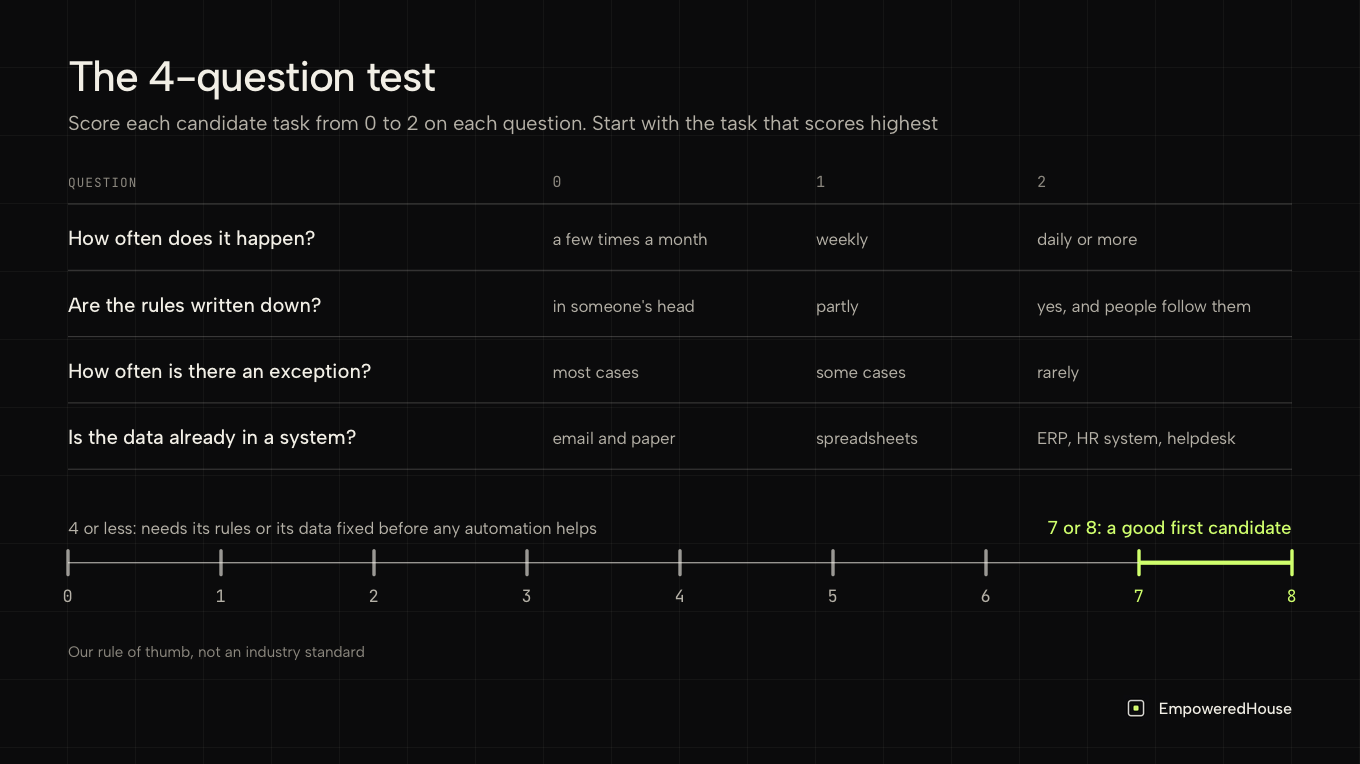
Score each candidate from 0 to 2 on 4 questions and start with the highest score.
| Question | 0 | 1 | 2 |
|---|---|---|---|
| How often does it happen? | a few times a month | weekly | daily or more |
| Are the rules written down? | in someone's head | partly | yes, and people follow them |
| How often is there an exception? | most cases | some cases | rarely |
| Is the data already in a system? | email and paper | spreadsheets | ERP, HR system, helpdesk |
A task that scores 7 or 8 goes on the shortlist. At 4 or less, fix the rules or the data first, because automating them as they are only copies the mess. This is our rule of thumb, not an industry standard.
The score gives you a shortlist, and the decision needs 2 more checks. First, what does 1 mistake cost? If an error touches money, system access, someone's pay or a legal duty, a person keeps the approval whatever the score. Second, does the system you already have do this? If your ERP or HR system has the feature, switch it on and configure it before you build anything.
Which back office automation examples work best in each department?
Here are 18 common back office tasks, sorted by whether they make a good first move. A few of them, such as ticket routing and order status questions, sit next to the back office in operations, and we keep them because they run on the same data and rules.
| Department | Task | Good first candidate? | Why |
|---|---|---|---|
| Finance | Supplier invoice capture and 3-way match | Yes, for invoices with a PO and a receipt | high volume, clear rules, the order and receipt already sit in the ERP; invoices without a PO go to a person |
| Finance | Bank reconciliation | Yes, with rules for fees and currencies | 1 bank feed is not enough once fees and currency differences appear; exceptions need a named owner |
| Finance | Payment reminders to customers | Partly | rules are simple, but tone and the relationship need a person |
| People | New-starter accounts, equipment and documents | Yes | a checklist exists and most steps repeat |
| People | Changes to employee records | Yes, if the HR system is the source | otherwise you automate copying between 2 versions of the truth |
| People | Payroll | Calculations yes, approval stays with a person | the system calculates; each error lands on someone's pay, so a person signs off |
| Procurement | Purchase request and approval by amount | Yes | thresholds are written rules |
| Procurement | New supplier set-up | Partly | a change of bank details needs a person and a call-back |
| Customer service | Ticket triage and routing | Yes | high volume, clear categories |
| Customer service | Order status questions | Yes | the answer is already in the order system |
| Customer service | Returns and complaints | Later | many exceptions |
| Sales operations | Lead assignment and duplicate clean-up in the CRM | Yes, if you have a CRM | clean data first |
| Sales operations | Quotes with discounts | Partly | routine discounts within the policy can run on rules; discretionary ones go to a person |
| IT and internal service | Password resets and access requests | Resets yes, access with approval | resets are daily and rule-based; new access needs a manager's approval |
| IT and internal service | Licence count against active users | Yes, with single sign-on | single sign-on does not cover every account, so tools outside it need a manual check |
| Order management | Orders from email and PDF into the ERP | Yes, with checks | formats vary, so a person reviews what the software is unsure of |
| Order management | Credit and stock checks | Yes | clear thresholds |
| Order management | Order confirmations to customers | Yes | the order, price and date already sit in the ERP |
Split and unusual orders are not a place to start: leave them to a person until the regular flow runs well.
Which back office tasks should you not automate first?
Payroll approval comes first on this list. The system can do the calculations, but each error lands on someone's pay, so a person checks and approves every run.
Keep a person and a call-back on every change of supplier bank details, too. Routine discounts within your policy can run on rules, while a discretionary discount goes to a person. Complaints stay manual for now, because there the exception is the work.
And a process nobody has written down is not ready. Write it down first. That is often when you find out 2 versions of it exist.
Does mandatory e-invoicing mean you should automate invoices first?
The law alone does not make invoices the right first task. In the UK, VAT-registered businesses will have to issue and receive VAT invoices as e-invoices from 1 April 2029, unless an exemption applies (HMRC and DBT roadmap, October 2026). The EU rule has a different scope: under VAT in the Digital Age, digital reporting applies to cross-border B2B transactions from 1 July 2030 (European Commission).
A structured invoice gives your system cleaner input, with nothing retyped from a PDF. Matching it still needs the purchase order, the goods receipt, written tolerance rules and a person for the exceptions. Without those, e-invoices only reach the same manual check sooner.
Do mid-sized companies already have the data to automate?
Most have somewhere to start. In Eurostat data for 2025, 70% of EU enterprises with 50 to 249 employees used an ERP system and 44% used a CRM (Eurostat, isoc_eb_iip).
An ERP licence does not prove the data is ready. For each process you want to automate, check whether its records are complete and who owns them, meaning the person who fixes a wrong record. That is why the finance and order rows in the table above get more Yes answers than the sales rows: their data already sits in the ERP.
Who owns the exceptions an automation cannot handle?
A named person, chosen before launch. BCG describes newer systems as "engineered to dynamically detect, route, and resolve" exceptions (BCG, June 2026); what they cannot resolve still lands with someone. Decide who receives those cases, how fast they answer and how you count them. A shared inbox full of exceptions means the work moved and nobody removed it.
Every week, count the cases the automation handled, the cases it passed to a person, the corrections people made afterwards and the time per case. Write down why each exception happened. Those reasons tell you whether to fix the rule, the data or the integration.
Measure time per case before launch, so you have a baseline. Then run the first weeks on a limited set of cases with a person checking the output, and widen the scope once corrections fall. Our piece on leading vs lagging indicators explains how to pick the early signal.
What if the task does not fit any tool?
Work through the options in order. Start with the settings of the ERP or HR system you already have. Next, connect your existing systems with an integration. An app of your own makes sense only for a valuable process that still needs workarounds every day after both steps. A low score on the test means the rules or the data need work first, before any app.
Some processes clear both steps and still run on Excel and email, because they make your company different. A generic tool then forces the team to work around it, as we describe in custom software vs SaaS.
With EHOS, a process that makes your company different can get its own app, built from how your team works. Rules and deadlines are kept by the system, so they don't depend on someone remembering; the system refuses steps nobody agreed to. You can see who did what and when. The code of the app we build for you is yours.
This is work in progress: we are exploring and testing these ideas in our clinic build, 1 process at a time. The clinic build report shows what that looks like in practice.
FAQ
How do you automate back office work in a mid-sized company?
Score each candidate task with the test above, check what 1 mistake would cost and whether your current system already does it, then name an owner for the exceptions.
What are examples of back office automation?
Supplier invoice matching, bank reconciliation, new-starter accounts, purchase approvals by amount, ticket routing, password resets and order entry into the ERP.
Is e-invoicing mandatory in the UK?
From 1 April 2029 for VAT-registered businesses: they will have to issue and receive VAT invoices as e-invoices, unless an exemption applies.
Do I need AI for back office automation?
No. A first task such as purchase approvals can run on rules inside your ERP or an integration tool. AI helps where inputs vary, such as orders arriving as emails or PDFs.
How do you measure whether back office automation works?
Each week, track how many cases the automation handled and passed on, how many needed a correction and how long each case took. The reasons behind exceptions show what to fix first.
Pick 1 task in your back office and score it with the test above. If it scores well and the team still works around your ERP every day, tell us which task it is and we will tell you whether an app built for it makes sense. Talk to us about EHOS.
Prepared by the Empowered House team; more about us.
Facts checked against the sources on 23 November 2026.