Multi-agent orchestration is the work of keeping several AI agents on one plan without losing what each of them knows. What worked for me in Claude Code is a shared folder of Markdown files: every agent reads its part of the folder when a session starts and writes back what changed before the session ends.
I joined EmpoweredHouse to run marketing, and today the work runs on 9 Claude Code agents, each responsible for one area. Here is the setup, the files I would create again, and what broke.
Why separate chats stopped working for me
I started with one conversation per area of work: website, blog, social media and so on. Each was good at its own job, and none knew what the others had decided. I copied decisions between chats by hand, and every time a conversation got long, part of what it knew was gone. Anthropic's documentation says it directly: each Claude Code session begins with a fresh context window. Whatever a conversation learns stays inside it unless it is written down somewhere else.
How multi-agent orchestration works in my setup
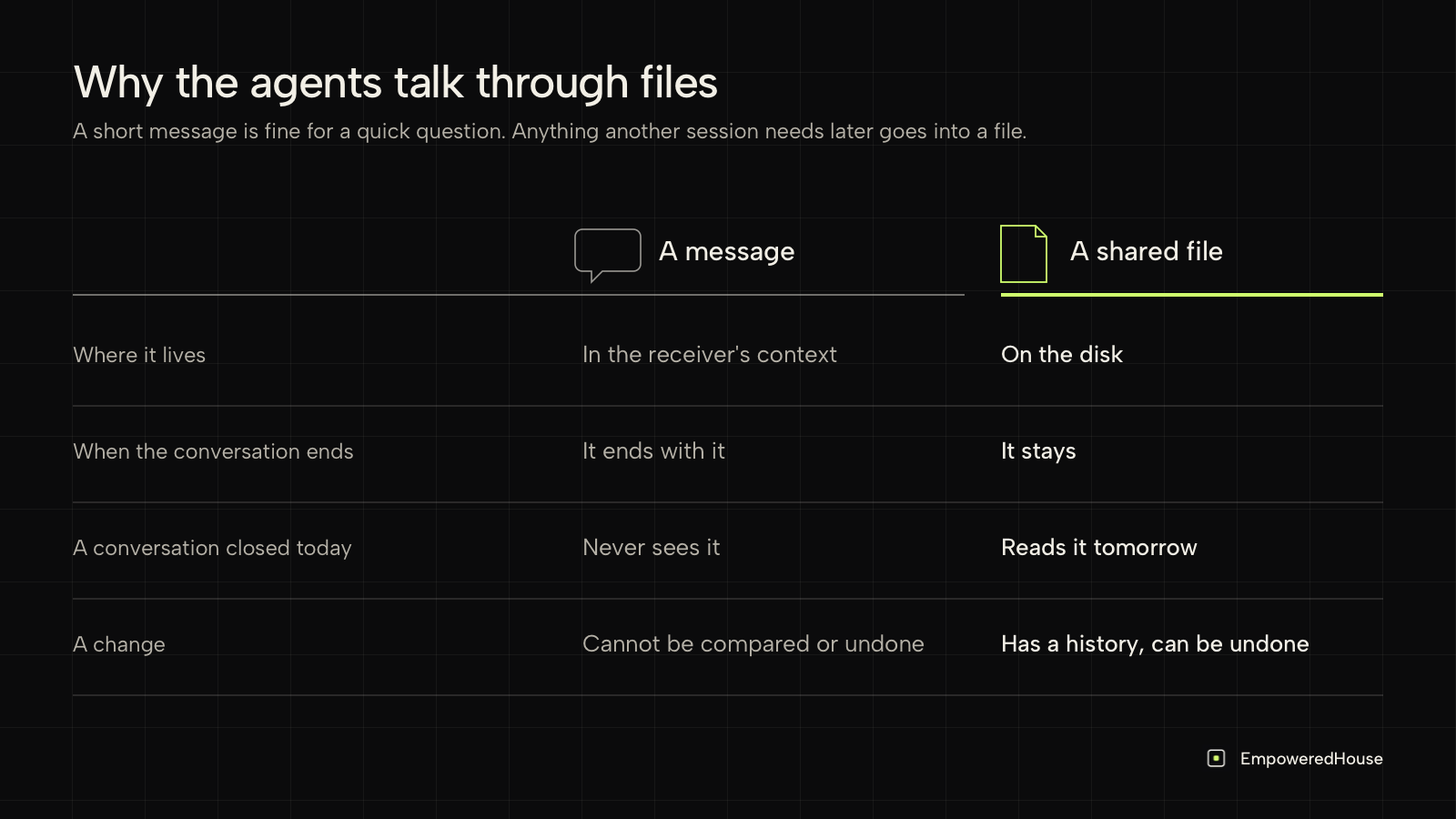
The conversations cannot see each other, but they can all see the same folder, so I gave them files to share. The idea is older than language models: in 1986 Penny Nii described the blackboard model, in which independent specialists work only through one shared structure.
In my experience, files work better than messages for anything that has to last:
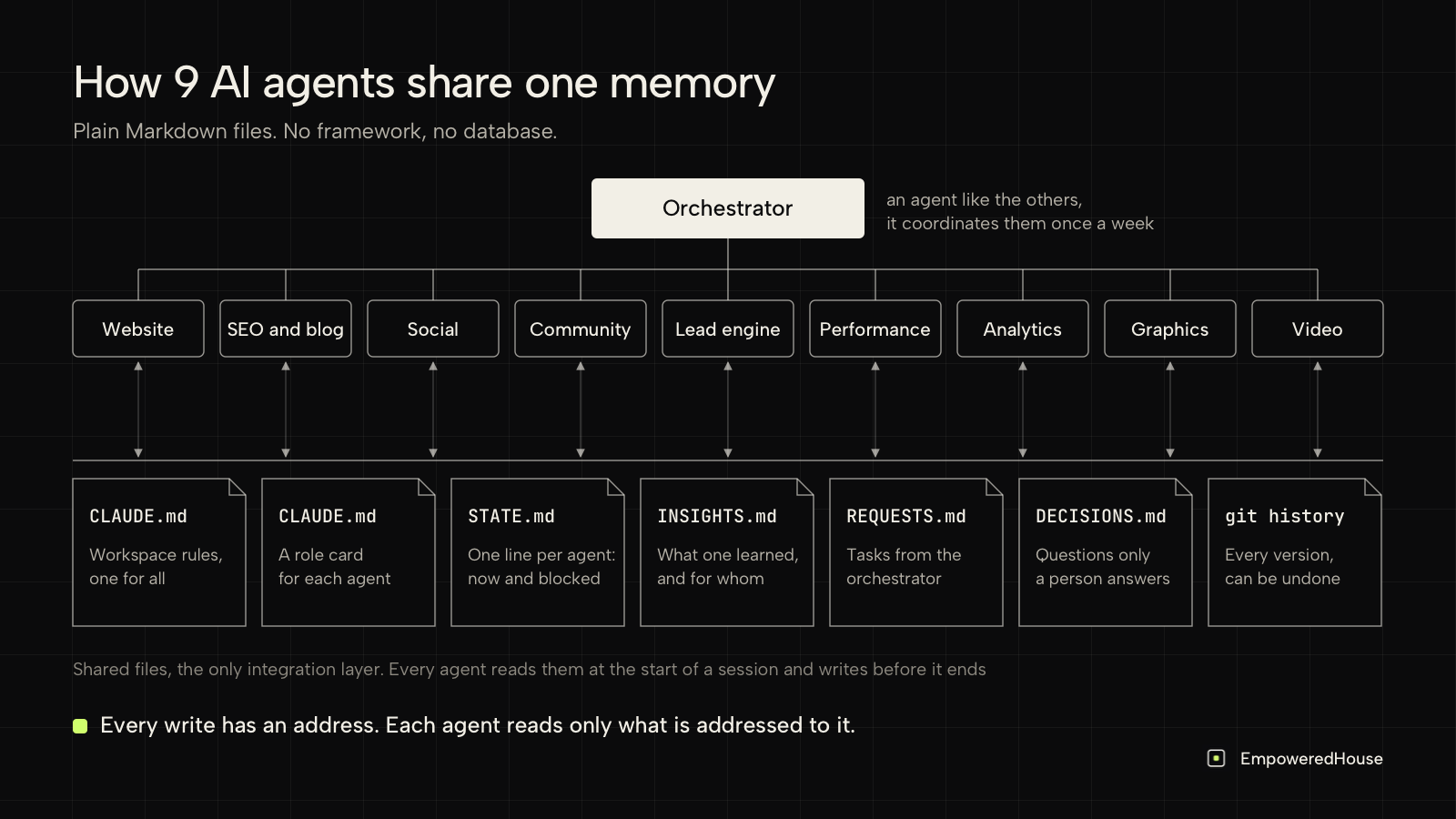
- A message lands in the receiver's context and ends with the conversation, while a file stays on the disk.
- A file reaches a conversation that is closed today and opens tomorrow.
- A file has a history, so a change can be compared and undone.
My agents can also send each other short messages for a quick question, but anything another session will need later still goes into a file.
What made the biggest difference is addressing. Every entry names who it is for, and an agent reads only its own rows, so it does not spend its context on everybody else's work.
The files I would create again
You do not need a framework for this. These 7 files are the whole system, and I would start with the same set:
| File | What it holds | Who writes it |
|---|---|---|
| Workspace instructions, the root CLAUDE.md | What the workspace is, which folder belongs to which agent, the session routine, what always needs a person | You, rarely |
| Role card, one CLAUDE.md per agent | Who the agent is, its folder, its plan, its rules and a handoff note from the last session | The agent itself |
| State | One line per agent: what it is doing now and what blocks it | Each agent, only its own line |
| Insights | An append-only log of what an agent learned, addressed to the agents that need it | Any agent |
| Requests | Tasks from the coordinating agent, one row per agent | The coordinator writes, each agent changes only its status |
| Decisions | Questions only a person can answer | Any agent asks, you answer |
| History | A local git repository that saves every version of every file | Every agent, at the end of a session |
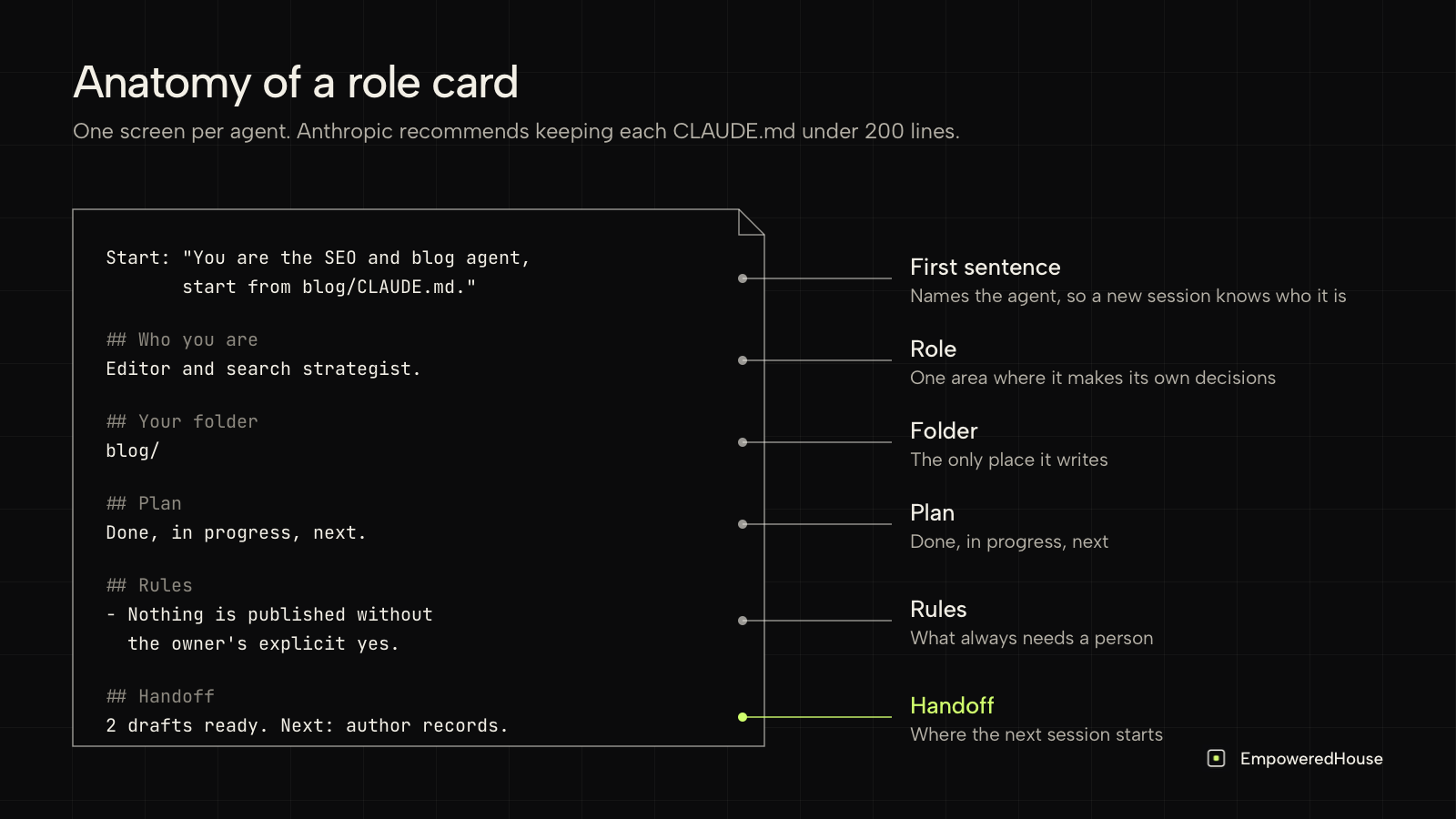
Keep the role card short. Anthropic recommends keeping each CLAUDE.md under 200 lines, because longer files use more context and are followed less reliably. Mine fit on one screen.
A role card, shortened:
Start: "You are the SEO and blog agent, start from blog/CLAUDE.md."
## Who you are
Editor and search strategist.
## Rules
- Nothing is published without the owner's explicit yes.
## Handoff
2 drafts ready for review. Next: author records in the CMS.
How an agent starts and ends a session
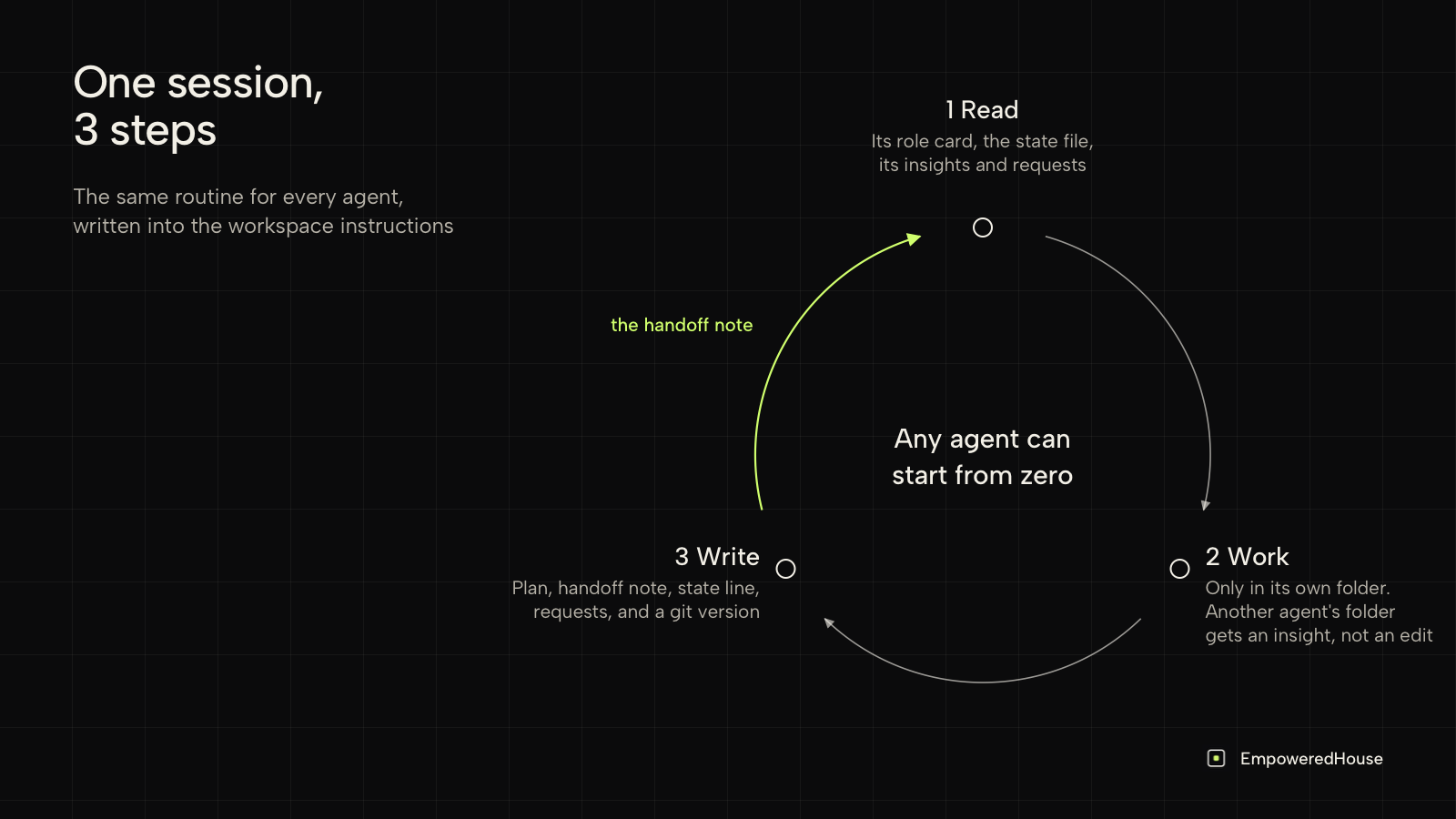
Every agent follows the same 3 steps, written into the workspace instructions so a new conversation picks them up by itself.
- Read. Its role card, the state file, the insights addressed to it plus the latest few, and its own open requests. Nothing else.
- Work in its own folder. If a change touches another agent's folder, it does not edit it. It writes an insight for that agent instead.
- Write before it stops. It updates its plan, its handoff note and its state line, marks its requests, and saves a version in git. It does the same whenever a conversation gets long.
The handoff note is what lets any agent start from zero. When a conversation fills up, I open a new one with the sentence at the top of the role card, and the new session picks up from the note.
How I would split the work into agents
- Give each agent one area where it makes its own decisions and one folder it owns. If 2 agents keep needing to change the same file, I read that as a sign they are one agent, or that the file belongs to a third.
- Pick one agent to coordinate. Mine is a conversation like the others: once a week it reads every state line and insight, fixes what drifted and writes requests.
- Start with fewer agents than you think you need, and split one when its work outgrows it. Social media and graphics began as a single agent. When the graphics work grew enough to fill its own week, graphics became a separate agent, and video followed. The social media agent kept the writing and the calendar, and it now orders graphics from the graphics agent the same way any other agent does.
- One-off jobs, like writing a long guide, get a temporary helper that ends with the task. I do not count those as agents.
What broke, and what I would do differently
- A view drifted from the files. A board of every agent's plan, updated by hand, fell behind within days. Now it is generated from the files.
- 2 agents wrote into the same cell. One request addressed several agents in one row, and each appended its status there. One row per agent per request fixed it.
- Nested role cards loaded together. Claude Code loads a subfolder's CLAUDE.md when it reads files there, so an agent working next to another agent's folder picked up both cards. I kept the layout and made the first sentence of every card name its agent.
- A date was read wrongly. A range written across 2 months was parsed as ending before it started. I now write one date per item, as YYYY-MM-DD.
What the 4 have in common is that something existed in 2 places, and the copies drifted apart. So far the fix has been the same every time: keep one copy and generate the rest from it.
Written rules are not guardrails
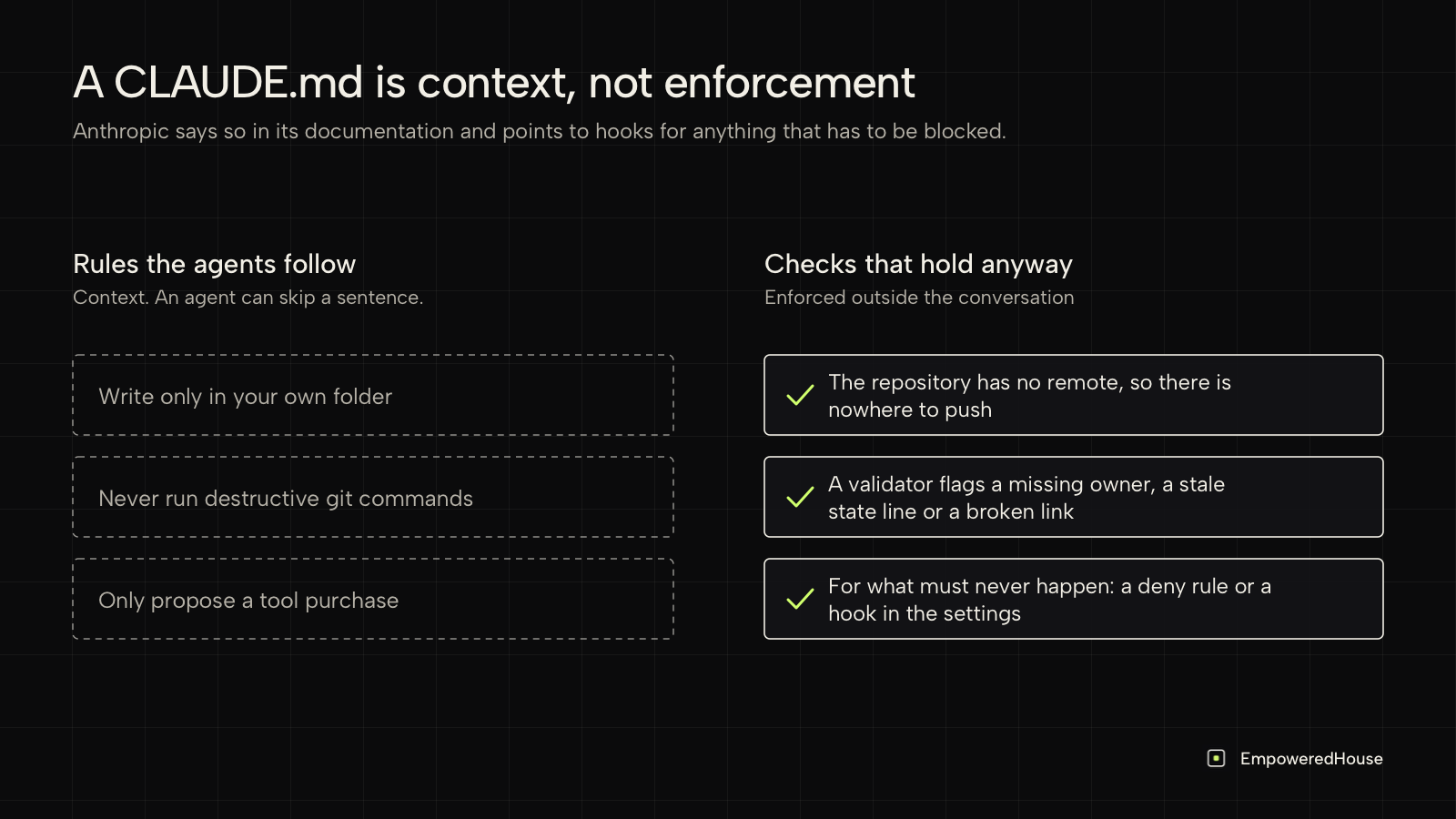
This is where I would be firm, because the documentation is. Anthropic says CLAUDE.md files are treated as context, not enforced configuration, and points to hooks for anything that has to be blocked. A rule like "never push code" is a sentence an agent can skip.
So I keep 2 lists. Rules the agents follow: write only in your own folder, never run destructive git commands, only propose a tool purchase. Checks that hold anyway: the repository has no remote, so there is nowhere to push to, and a validator flags a missing owner, a stale state line or a broken link every time the board is rebuilt. For anything that must never happen, Claude Code lets you add a deny rule or a hook in its settings that blocks the action itself.
Copy the setup prompt
If you want to try this with your own team, open Claude Code in an empty folder and paste the prompt below. You do not need to be an engineer. It asks you 5 plain questions about your work, shows you the folders it wants to create and waits for your yes. "Commit" in the prompt means saving a version of the files, so any change can be undone. In a chat tool that cannot create files, it prints every file for you to save.
You are setting up a multi-agent workspace in this folder. Each area of work gets
its own Claude Code conversation, and the conversations coordinate through Markdown
files here. Anything another session will need later goes into a file.

STEP 1. Ask me these questions one at a time and wait for each answer:
1. What is the work, and what should it produce in the next 90 days?
2. Which 3 to 8 areas should each get their own conversation? For each: what it
   owns and what it must never do. One of them coordinates: once a week it reads
   everyone's state and insights, fixes what drifted and hands out requests.
3. Who is the accountable person, and who else reads the state?
4. Which actions always need that person's explicit yes: publishing, sending,
   buying, deleting?
5. Which facts must never be invented: prices, names, dates, customer data?

STEP 2. Show me the folders and files you plan to create. Wait for my yes.

STEP 3. Create:
- CLAUDE.md at the root, under 80 lines: what this workspace is, each area and its
  folder, the session routine below, and the actions that need a person.
- ops/STATE.md (one row per area), ops/INSIGHTS.md (append-only, each entry says
  who it is for), ops/REQUESTS.md (one row per area per request; an area changes
  only its own status) and ops/DECISIONS.md (questions only the person can decide).
- <area>/CLAUDE.md, one role card per area, under 100 lines, starting with: "You
  are the <NAME> agent, start from <path>/CLAUDE.md". Sections: who you are, your
  folder, plan, rules, handoff note.

SESSION ROUTINE, write it into the root CLAUDE.md word for word:
1. On entry, read your role card, ops/STATE.md, the insights addressed to you or to
   all plus the latest 12, and your open requests.
2. During the session, work only in your own folder. If a change touches another
   area's folder, do not edit it; add an insight addressed to that area.
3. Before ending, and whenever the conversation gets long, update your plan, your
   handoff note, your STATE row and your request statuses, add insights others
   need, then commit.

SAVING VERSIONS: set up a local git repository with no remote, so every change can
be undone. Each area commits only what it changed. Never push, reset, rebase or force.

HARD LIMITS: written instructions are context, not enforcement. For anything that
must never happen, propose a setting that blocks it (a permissions.deny rule or a
PreToolUse hook in .claude/settings.json), explain it in one plain sentence, and
add it only after my yes.

WRITING RULES: plain language, dates as YYYY-MM-DD, numbers as digits. Never invent
a number, a name, a date or a budget; write that it is missing instead.

STEP 4. Print the first sentence to paste into each new conversation, and a
5-line weekly checklist for the coordinating agent. If you cannot create files,
output every file in full with its path and I will save them.
The setup is our method applied to my own work: each agent has a written role and one folder, every change leaves a trace, and a person reads the state in one line per agent. If you want to go deeper into the memory files themselves, I wrote about how AI agent memory works when every session starts from zero.
Frequently asked questions
What is multi-agent orchestration? Multi-agent orchestration, also called AI agent orchestration, is how several AI agents are kept working toward one plan. Mine coordinate through shared files.
Do AI agents need to talk to each other directly? In my experience they need to communicate precisely more than directly. An addressed row in a shared file reaches the right agent, even one whose conversation is closed.
How do you handle context window limits with several agents? Assume any agent can start from zero: short role cards, each agent reading only its own share, and a handoff note at the end of every long session.
What is a CLAUDE.md file? A Markdown file of instructions that Claude Code loads as context at the start of a session. I use one for the workspace and one per agent.
Can one person run marketing with AI agents? One person can coordinate it. The agents draft, research and keep records; every decision, purchase and publication still goes through a person.
This setup is one example of the kind of work people share in Empowered Community. It is a small group of people who build with AI agents inside their own companies and show each other the work as it happens, including the parts that break, so the next setup you read there comes from someone other than me. If you are building something like this, apply to Empowered Community.